

https://your-app.kleap.io. But you own your code — it’s a standard Astro
project, so you can build it and host it anywhere that serves static or edge sites.
Self-hosting means hosting the static Astro build. Features backed by Kleap
services — Kleap Database, KleapForm submissions, and built-in user
accounts — are provided by Kleap. If your site uses them, keeping the site on
Kleap Hosting is simplest; self-hosted copies would need those services to stay
reachable.
Getting Your Code
Export to GitHub
- Open Settings > Project settings > Integrations
- Choose GitHub and click Connect
- Push your code to a repository
- Clone the repository locally
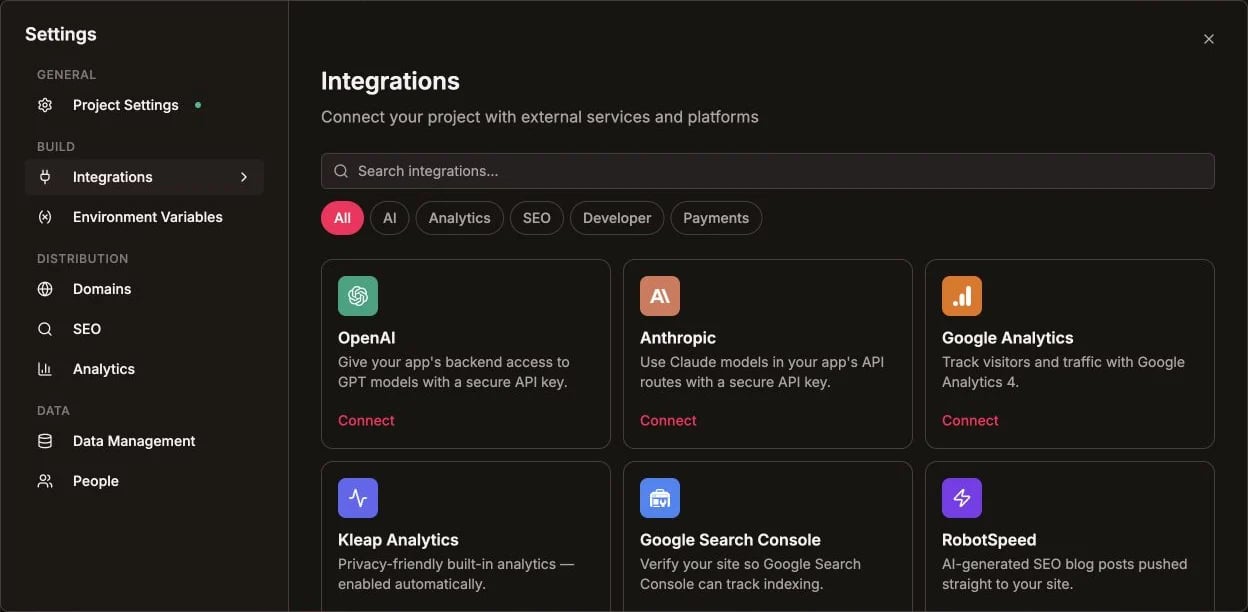
Connect GitHub from the Integrations catalog
Inspect Before Exporting
Open Settings and choose View code to inspect the project before pushing it to GitHub.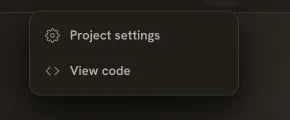
Use View code to inspect the project source
Running Locally
Prerequisites
- Node.js 18.20.8+ (or 20+/22+)
- npm or pnpm
Setup
http://localhost:4321 (Astro’s default dev port).
Build for Production
Astro outputs a static site to thedist/ folder:
Hosting Options
Any static or edge host works. Point it at thedist/ output.
Cloudflare Pages
- Connect your GitHub repo
- Build command:
npm run build - Output directory:
dist
Netlify
Vercel
- Import the GitHub repo
- Vercel auto-detects Astro
- Output directory:
dist
Static Host / VPS
dist/ is plain static files — serve it with Nginx, Caddy, an S3 bucket +
CDN, GitHub Pages, or any static host.
Environment Variables
Astro exposes variables prefixed withPUBLIC_ to the browser via
import.meta.env. If your site calls any external service, set its variables in
your hosting platform:
Custom Domains
On Kleap Hosting
If you stay on Kleap, point your domain with an A record to Kleap’s proxy:On Your Own Host
Most platforms support custom domains from their dashboard:- Add the domain in your host’s dashboard
- Configure DNS per that host’s instructions (A record for root, CNAME for subdomains)
- SSL is usually automatic
CI/CD Setup
GitHub Actions
Monitoring
Analytics
Add analytics by including their script in your base layout:- Plausible - Privacy-focused
- Google Analytics - Comprehensive
- PostHog - Product analytics
Uptime Monitoring
- UptimeRobot - Free monitoring
- Pingdom - Professional monitoring
- Better Uptime - Status pages
Performance
A static Astro build is already fast — it ships HTML with minimal JavaScript (React only hydrates the interactive islands). To go further:- Put a CDN in front of your static host (Cloudflare, CloudFront, Fastly)
- Keep images optimized and lazy-loaded
- Limit interactive islands to what actually needs them
Comparison
Troubleshooting
Build fails
Build fails
- Check the Node.js version (18.20.8+, or 20+/22+)
- Verify all dependencies install (
npm ci) - Check any required environment variables are set
- Review build logs for the specific error
Pages 404 on my host
Pages 404 on my host
- Make sure the publish/output directory is set to
dist - Serve
dist/at the site root, not a subfolder - Check your host supports clean URLs for static files
Kleap features stopped working
Kleap features stopped working
- Forms, Kleap Database, and accounts are Kleap-backed services
- Self-hosted copies need those services to remain reachable, or you’ll need to replace them
- Keeping the site on Kleap Hosting avoids this entirely
Publishing with Kleap
The easiest deployment option