

Publishing is a deliberate action
Your site is not public until you publish it. Building and refining in the editor changes nothing for visitors — that way an unfinished site never goes live under your name. When you’re ready, click Publish (top-right in the builder). Kleap builds your site and deploys it to a permanent URL.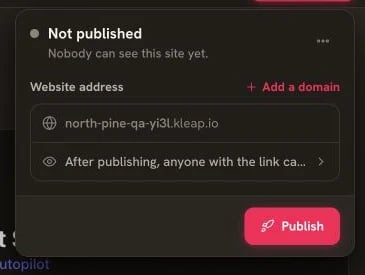
Open the Publish panel, check the address, then click Publish
Publishing does not consume AI credits. Publishing availability, hosting, and published-project limits depend on your plan; see current pricing.
Your Production URL
Once published, your site is live at a permanent URL:- Remains available until you unpublish it, subject to the Terms of Service
- Is publicly accessible
- Supports HTTPS automatically
- Is served on a global edge network for fast loading worldwide
- Can be shared with anyone
Preview vs Production
The preview is a real build of your current files, so what you see is what visitors get.
Updating Your Site
After the initial publish:- Make changes in Kleap (or ask the AI)
- Review the updated preview
- Click Update when you want the new version to go live

Publish and Update use the same top-right deployment panel
Deployment Status
Track your deployment:- Building — your site is compiling
- Deploying — uploading to the edge
- Ready — live and accessible
- Error — build failed (see the error and re-try)
Custom Domains & Going Further
Custom Domains
Connect your own domain with free SSL
Analytics
Track your site’s visitors
Unpublishing
To take your site offline:- Go to Settings
- Choose Unpublish
- Your site is no longer publicly accessible
Unpublishing doesn’t delete your site — you can republish anytime.