

Safe by default
Every Kleap site ships with these protections built in:- HTTPS everywhere - SSL is automatic on your
{app}.kleap.ioaddress and on any custom domain you connect. Nothing to configure. - No server secrets in the site - Your published site is static HTML/CSS/JS. Kleap never bundles secret keys or credentials into it.
- Server-validated forms - Form submissions are validated, sanitized, and rate-limited by Kleap before they reach you. No setup required.
- Secure headers - XSS protection, HSTS, and other hardening headers are applied for you.
- Pre-build checks - Before publishing, Kleap scans for accidentally exposed secrets and unsafe patterns.
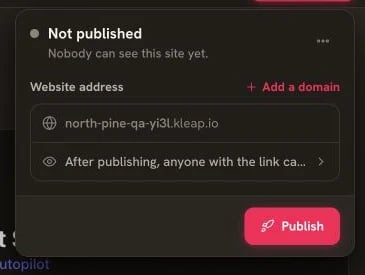
Review the Publish panel only after the preview is ready
Pre-Build Security Checks
Before your site goes live, Kleap automatically scans for:- Exposed secrets - Secret API keys or passwords accidentally placed in the site
- Hardcoded credentials - Tokens or private keys that don’t belong in a public site
- Unsafe patterns - Risky code such as injecting unescaped user content (XSS risks)
Keep secrets out of your site
Your published site is static, which means anything inside it can be viewed by anyone. That’s fine for the code that runs your pages, but it means secrets must never live there.- Publishable keys are OK. Keys that are designed to be public — like a Stripe publishable key (
pk_live_.../pk_test_...) — are safe to include in a site. - Secret keys are never OK. A secret key (
sk_live_...), database password, or private API token must never appear in your site or in a prompt.
User accounts & dynamic data
Need logins, saved data, or content that changes per user? Turn on the Kleap Database — a managed database with built-in user accounts. It’s optional and available on demand; just ask the AI to add it when your app needs it. You don’t connect or manage any outside database yourself.Built-in accounts
Kleap Database includes email + password user accounts with the sign-up and log-in UI provided for you. Passwords are hashed and sessions are managed securely — you don’t have to build any of it.Each user sees only their own data
Data access is scoped per user, so each signed-in user can only see and change their own rows. This is the primary defense for your data: even though many users share one database, Kleap keeps everyone’s data separated at the database level.Scope data to the signed-in user
Scope data to the signed-in user
Kleap ensures a user only ever reads or writes rows that belong to them. When you add data features through Kleap, ask the AI to make sure each table is scoped to the current user so no one can read someone else’s records.
Protect pages behind a login
Protect pages behind a login
For pages that should only be visible to signed-in users (like a dashboard or account area), put them behind a login gate. Ask the AI to add authentication so visitors must sign in before they can view the page.
Let Kleap validate input
Let Kleap validate input
You don’t write server code, so input validation on saved data and form submissions is handled by Kleap. Still keep messages and inputs sensible on the page (e.g. required fields, reasonable lengths) for a good user experience.
Forms
Contact and lead forms you add with Kleap are handled server-side by Kleap. Every submission is validated, sanitized, and rate-limited automatically, then delivered to your dashboard. There’s nothing to configure and no keys to manage — spam and abuse protection is built in.Common Vulnerabilities
What Kleap helps prevent
What you should keep in mind
- Keep secrets out of the site - Only publishable keys belong in a static site.
- Don’t expose sensitive data - Don’t display private information on a public page.
- Protect the right pages - Put account/dashboard pages behind a login.
- Scope data per user - Confirm each data feature is limited to the signed-in user.
Security Checklist
Before launching, verify:1
No secrets in the site
Only publishable keys are used; no secret keys, passwords, or private tokens anywhere in the site or your prompts.
2
Accounts (if used)
If your app has logins, they use Kleap’s built-in accounts.
3
Data scoped per user
If you store data, Kleap limits each user to their own rows.
4
Protected pages
Private pages (dashboards, account areas) are behind a login.
5
HTTPS
Your site and any custom domain load over HTTPS (automatic with Kleap).
Reporting Vulnerabilities
Found a security issue? Contact us:- Email: [email protected]
- We’ll respond within 24 hours
- Responsible disclosure appreciated
Compliance
- GDPR - Kleap supports EU data protection practices.
- Encryption in transit - All traffic is served over HTTPS/TLS.
- Other requirements - Have a specific compliance need? Contact us.
Security Tips
Detailed guide to avoiding security pitfalls