

Where Your Files Live
Your site’s files are stored and managed by Kleap. That managed copy is the source of truth — the AI edits it, and every preview and publish builds from it. You don’t run or maintain a separate environment.Preview
When you make a change, Kleap runs a real, ephemeral build of your Astro site and shows the result in the editor’s preview pane.- The preview reflects your latest changes after each build
- It’s for you, inside the editor — not a public URL
- Nothing to “wake up” or restart; there’s no idle timeout to hit
For a permanent, public URL, publish the reviewed draft
to
https://your-app.kleap.io.Publishing
Publishing is deliberate. When the preview is ready, open Publish, check the address, and click Publish in the panel. Kleap builds your site and deploys it to a global edge network athttps://your-app.kleap.io with free SSL.
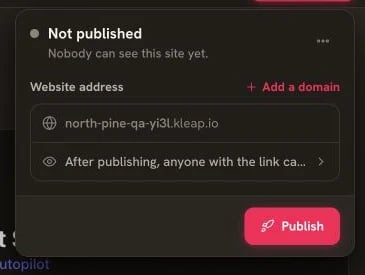
The Publish panel is the boundary between preview and production
What’s Preserved
Because there’s no persistent dev server, there’s no in-memory app state to
lose between sessions — the site is rebuilt fresh each time.
Preview vs Production
Common Questions
Is there a dev sandbox I need to keep running?
Is there a dev sandbox I need to keep running?
No. Astro sites don’t use a long-running sandbox. Kleap builds your site on
demand for preview and again when you choose Publish or Update.
Will I lose my code?
Will I lose my code?
No. Your files are managed by Kleap and saved continuously, with full version
history.
Why doesn't my preview match the live site yet?
Why doesn't my preview match the live site yet?
The preview shows your latest local changes. The live site updates when the
next Publish or Update build finishes.
Where is my data stored?
Where is my data stored?
If you added Kleap Database, your data lives there independently of any build.
Form submissions land in your dashboard’s Data panel.
Publishing Your App
How your site goes live at your-app.kleap.io