

Types of Errors
Build Errors
Happen when code can’t compile:- Syntax errors
- Missing imports
- Type errors
- Invalid JSX
Runtime Errors
Happen when the app runs:- Undefined variables
- Failed API calls
- Null reference errors
- Logic bugs
Visual Bugs
The code works but doesn’t look right:- Wrong colors or sizing
- Broken layouts
- Missing elements
- Responsive issues
Debugging Workflow

Use Refresh, Edit, and Version history while diagnosing a problem
1
Identify the error
Read the error message carefully. What does it say?
2
Share with AI
Paste the error message in chat
3
Provide context
Explain what you were trying to do
4
Let AI fix it
AI will analyze and propose a fix
5
Verify the fix
Check if the issue is resolved
Effective Error Reporting
Include the Error Message
Describe What Happened
Mention What Changed
Common Errors and Solutions
”Cannot find module”
- Component doesn’t exist
- Wrong import path
- Typo in filename
“Hydration mismatch”
- Different content on server vs client
- Using
windoworlocalStoragewithout checks - Date/time rendering
“X is not a function”
- The data isn’t an array yet (still loading)
- Unexpected shape returned from the Kleap Database
- Missing initial value
“Failed to fetch”
- The form isn’t wired to send submissions
- Network problem
- The Kleap Database read was blocked
Visual Debugging
When something looks wrong but there’s no error:Describe What’s Wrong
Reference What You Expected
Use Element Selection
- Click Edit in the builder toolbar
- Click the broken element
- Describe what’s wrong
- AI has context to fix it
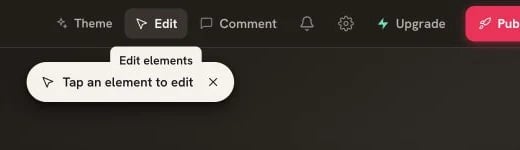
Edit elements lets you point the AI at the exact broken element
When AI Can’t Fix It
Provide More Context
Try a Different Approach
Undo and Restart
If things are too broken:- Open version history
- Restore to a working version
- Try a different approach

Open Version History to recover a working state
Debugging Kleap Database Issues
Data Not Loading
Empty Results
Account Issues
Prevention Tips
Test frequently
Test frequently
Don’t wait until you’ve made many changes. Test after each significant addition.
One change at a time
One change at a time
Make one change, verify it works, then move on. Easier to debug.
Use version history
Use version history
If something breaks badly, you can always roll back.
Read error messages
Read error messages
Error messages often tell you exactly what’s wrong. Share them with AI.
Browser DevTools
For advanced debugging:- Open DevTools - Right-click → Inspect (or F12)
- Console tab - See JavaScript errors
- Network tab - Check API calls
- Elements tab - Inspect HTML/CSS
Troubleshooting Guide
Solutions to common problems