

How Kleap Uses AI
When you send a message, Kleap:- Understands your intent and context
- Plans the changes needed
- Generates clean, production-ready code
- Applies changes to your site
- Verifies the result builds and looks right
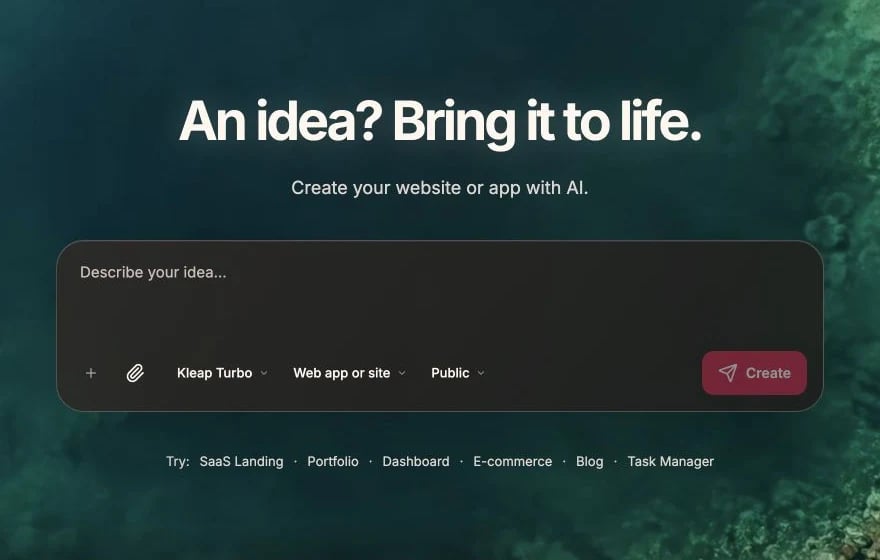
Describe what to build, choose an AI mode, then click Create
What the AI Can Do
Build Pages & Sections
Turn descriptions into real pages and layouts
Style Your Site
Apply colors, typography, spacing, and animations with Tailwind
Add Interactivity
Menus, sliders, tabs, and forms via React islands
Add Data & Accounts
Wire up Kleap Database and user logins when needed
Optimize for SEO
Metadata, structure, and content that ranks
Debug & Refine
Find and fix issues, then iterate
What AI Does Best
- Beautiful UI — turning descriptions into polished, responsive designs
- Content & SEO — headings, copy, and structured metadata
- Forms & lead capture — contact, newsletter, and quote forms
- Common patterns — landing pages, portfolios, business sites, blogs
What Needs More Guidance
- Complex business logic — be specific about the rules
- Custom, unique designs — reference examples or give detail
- Advanced integrations — describe the expected behavior
Prompt Tips for Best Results
Be Specific
Provide Context
Break Down Complex Tasks
Instead of:Code Quality
AI-generated code follows modern best practices:Context Understanding
The AI understands:- Your whole site — existing pages, components, and patterns
- Selected elements — what you clicked in the preview
- Conversation history — earlier messages in the session
The more you build, the better the AI understands your project’s style and preferences.
Credits & Usage
Each AI message consumes credits based on how much work it does — see Plans & Credits. Tips to get more from each credit:- Be concise but specific
- Use element selection to point at exactly what you mean
- Break large tasks into smaller messages
- Edit plain text directly in the preview (that’s free)

The builder toolbar keeps Edit and other actions within reach
Privacy & Security
- Your code is processed securely to build your site
- Never paste secret keys, passwords, or private tokens into prompts
Prompting Best Practices
Learn how to write effective prompts